Register & Get Involved

Texas Regional Event

Build targeted solar + storage connections in Texas.

Flagship Event

Make valuable connections and source new business partners at Intersolar & Energy Storage North America. 

Midwest Regional Event

Explore the latest solar innovations in the Midwest.

Stay Informed

Join our mailing list to hear about the latest event updates!

Mobile App

Matchmaking, Meeting Scheduling & Event Updates—at Your Fingertips

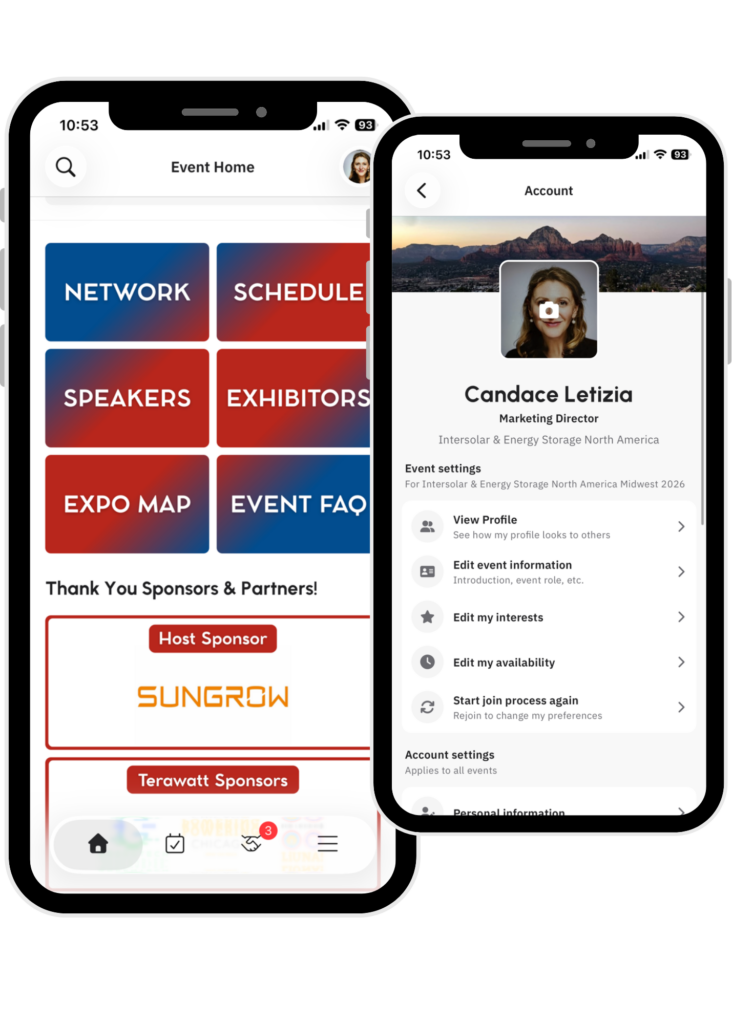
IESNA Midwest’s mobile app provides access to everything you need onsite—the event schedule, exhibit hall map, conference program, and more. Key features include:

  • New-for-2026, AI-powered matchmaking designed to take the guesswork out of meeting the right contacts and scheduling time onsite
  • Browse the agenda and plan your custom schedule
  • See exhibiting companies and plan your time in the exhibit hall
  • View the conference program
  • Meet our speakers, sponsors, and partners

You must be registered to attend or exhibit at IESNA Midwest 2026 to access the app.

AI Powered Matchmaking Details

Networking recommendations are based on interests and intents. When you log into the app, you will be prompted to answer a series of questions about your role and goals for the event. The app then uses AI technology to match your answers to exhibitor capabilities, recommending meetings and connections.

Important: The app will only show event participants who have logged in to the app. You can filter and search the list to find specific people, start chats, and schedule meetings with your connections—all within the app.

Note: Non-exhibiting suppliers do not have access to AI-powered matchmaking. To upgrade your registration, please contact sales@iesna.com.

IESNA Midwest Mobile App

How to Download and Access the Mobile App

  1. Click the button or scan the corresponding QR code to download from the correct app store for your mobile device—Google Play or Apple.
  2. Click Get Started.
  3. Type your email (must be the email you used to register for IESNA Midwest).
  4. Create a password.
  5. Click the event (make sure to select the Midwest 2026 version).
  6. Create your profile.

Or, access the web platform here.

Need help while onsite?

Max McKeeMax McKee, IESNA Marketing Manager, will be available to answer any questions and help troubleshoot. You can find him at our Mobile App Help Desk, located in the North Ballroom Foyer near Registration.
App Store
Google Play